The Master Showtime Template is actually an extention of the Master Feature Template. The actual database where these showtimes are kept is the same as the Master feature Template. The showtimes are actually part of the feature record, only shown in this seperate window so that the user has more space in which to work.
There are two ways to access the Master Showtime Template. You can select to edit a feature's showtimes by pressing the showtime button in the Master Feature Template screen, where you are limited to only the chosen feature, or you can start the Master Showtime Template directly from the Manager's Main menu and have access to all of the features in the Master feature Template via a drop down list.
From the Master Feature Template:
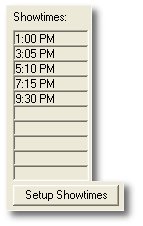 or
From the Manager's Screen:
or
From the Manager's Screen:
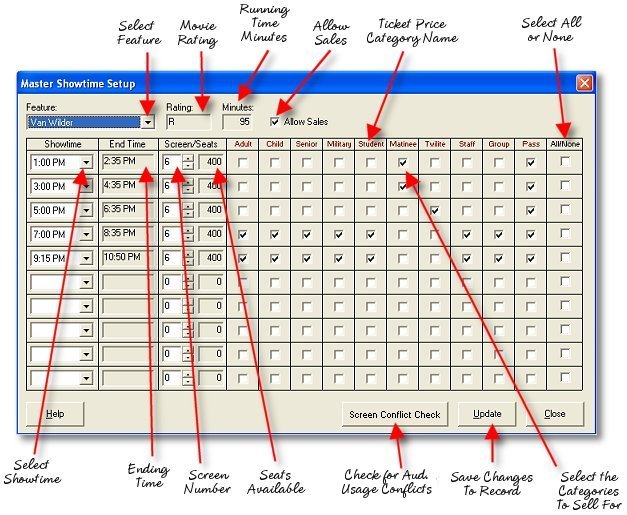
The example above shows the showtime template with the drop-down feature list as found when starting the Template from the program's menu.
Frequently Asked Questions:
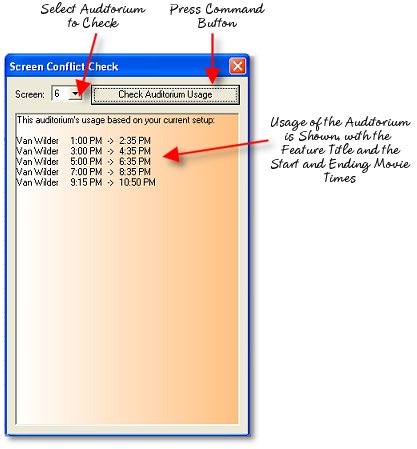
Is there conflict checking to show if I have set two features to play at the same time on one screen?
Yes and No. The system won't identify conflicts for you but you can use the conflict checker to view the usage of a particular screen for a day to determine if scheduled features overlap in any way. Select the screen number and press the "Check Auditorium Usage" command button to display a list of features, showtimes and end times as you have the system programmed. If you have overlapping times, you will have to correct the schedule yourself.
What Goes Here? (Fields you may not know what to enter in)
Select Feature - This drop down list allows you to select from available features in the Master feature template. This drop down list is not available if you have opened the showtime template from within the Master feature template, in which case that selected feature's showtimes are displayed.
Select Screen - This is a selector that allows you to scroll through available auditorium screens. This combo box is tied to the seat count window to it's right, which displays the number of seats available in the auditorium selected.
Allow Sales (Checkbox) - This checkbox when checked makes the feature available for ticket sales.
Ticket Category Headings - All of your ticket price categories are shown here with checkboxes below them in which you select the ticket categories you want available for sale at a particular showtime. If you want a certain category to be available for sale, be sure it's checkbox is checked for the appropriate showtime.